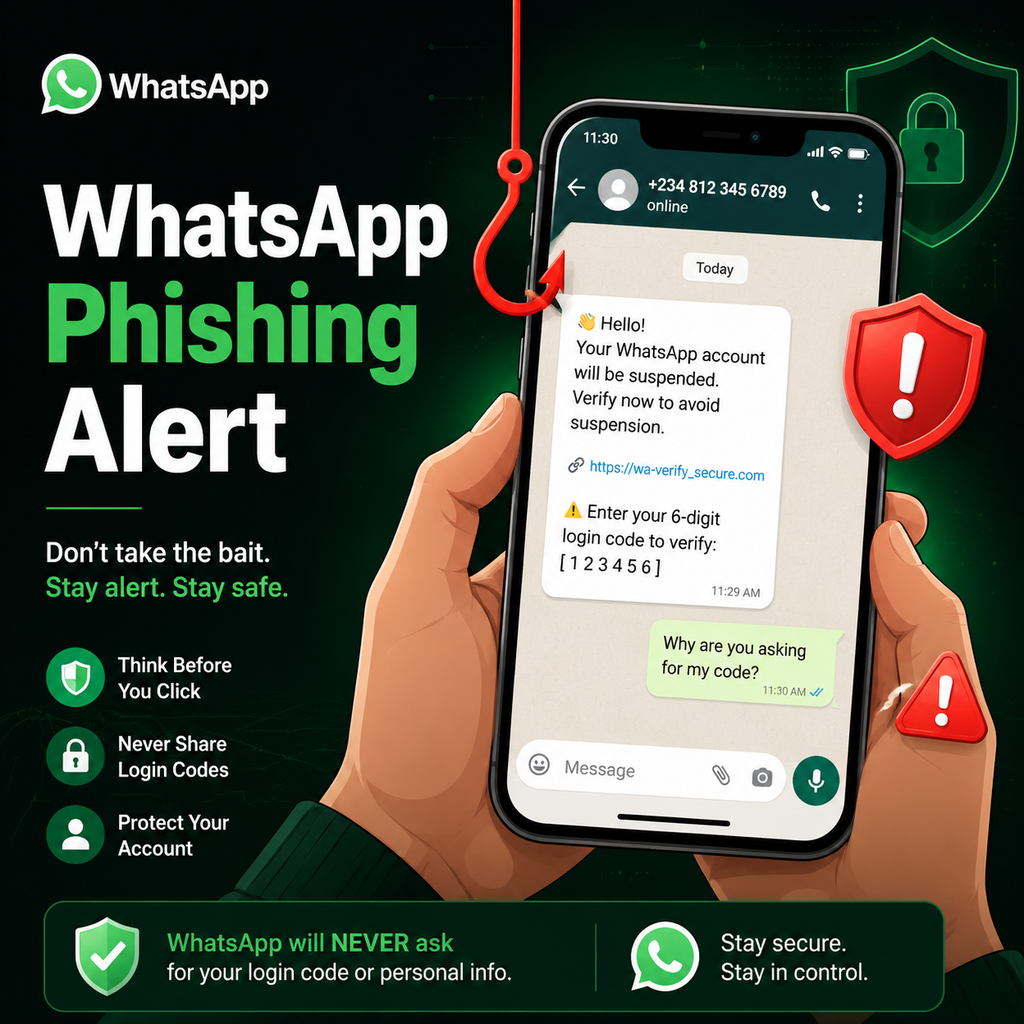
Lừa đảo WhatsApp: 7 On Your Side có những điều bạn cần biết
Cấu trúc của một vụ lừa đảo WhatsApp
Nó bắt đầu bằng một tin nhắn đơn giản và một liên kết tưởng chừng vô hại, nhưng sau một cú nhấp chuột nhanh, bạn đã trao cho những kẻ lừa đảo quyền truy cập vào thứ có giá trị hơn mật khẩu của bạn: danh bạ đã lưu của bạn. Đây không phải là trò đùa ngày Cá tháng Tư—những kẻ lừa đảo đang trau dồi các kỹ thuật mới, tìm cách xâm nhập vào tài khoản của bạn, và nó không chỉ là kiếm tiền nhanh. Chúng đang nhắm đến 'vàng' của kẻ lừa đảo, nằm ngay trong điện thoại thông minh của bạn. Những kẻ xấu đang tạo các tên miền WhatsApp giả với tốc độ đáng báo động—hơn một chục mỗi ngày, theo các chuyên gia an ninh mạng.
Những nỗ lực lừa đảo này thường ngụy trang thành các tin nhắn hợp pháp từ chính WhatsApp, yêu cầu bạn đặt lại thông tin đăng nhập hoặc xác minh tài khoản. Nhưng liên kết dẫn đến một trang web giả mạo được thiết kế để đánh cắp thông tin đăng nhập của bạn. Một khi kẻ lừa đảo có quyền truy cập, chúng có thể mạo danh bạn với gia đình và bạn bè, yêu cầu tiền hoặc thông tin cá nhân dưới chiêu bài khẩn cấp.
Các chiêu trò lừa đảo WhatsApp phổ biến
Lừa đảo mã xác minh
Một trong những loại lừa đảo tinh vi nhất có vẻ thông thường. Bạn nhận được tin nhắn nói rằng mã đăng nhập hoặc mã bảo mật đã được gửi đến bạn do nhầm lẫn, sau đó là yêu cầu chia sẻ nó một cách bình thường. Sự thật là những kẻ lừa đảo đang cố gắng xâm nhập vào tài khoản của bạn. Mã đó là bước cuối cùng. Khi đã chia sẻ, chúng có thể đặt lại mật khẩu, khóa bạn ra ngoài và hành động nhanh trước khi bạn nhận thấy có điều gì đó sai.
Lừa đảo mạo danh và khẩn cấp
Kẻ lừa đảo tạo tài khoản WhatsApp giả mạo làm người bạn biết, chẳng hạn như bạn bè, thành viên gia đình hoặc đồng nghiệp. Sau đó, chúng sử dụng các tài khoản này để gửi tin nhắn yêu cầu tiền hoặc thông tin cá nhân, lợi dụng lòng tin giữa bạn và người bị mạo danh. Một số thậm chí sử dụng tin nhắn giọng nói deepfake để nghe có vẻ thuyết phục hơn.
Liên kết lừa đảo
Lừa đảo là một trong những chiến thuật phổ biến nhất được sử dụng bởi kẻ lừa đảo trên WhatsApp. Chúng gửi tin nhắn chứa các liên kết có vẻ như từ các nguồn đáng tin cậy, chẳng hạn như ngân hàng, cơ quan chính phủ hoặc các công ty nổi tiếng. Các liên kết này dẫn đến các trang web giả mạo được thiết kế để đánh cắp thông tin đăng nhập, thông tin tài chính hoặc dữ liệu nhạy cảm khác của bạn. Luôn kiểm tra kỹ URL trước khi nhấp vào—tìm các từ thừa, tên miền lạ hoặc dấu gạch ngang.
Cách nhận biết lừa đảo WhatsApp
Các dấu hiệu cảnh báo thường xuất hiện trong chi tiết. Dưới đây là một số cách để phát hiện lừa đảo WhatsApp:
- Tin nhắn bất ngờ: Kẻ lừa đảo gửi tin nhắn hàng loạt và hy vọng ai đó trả lời.
- Tính cấp bách: Chúng gây áp lực để ngăn bạn suy nghĩ hoặc kiểm tra trước khi trả lời.
- Yêu cầu mã: Chúng thường sử dụng mã xác minh để chiếm quyền tài khoản.
- Liên kết đáng ngờ: Các trang và tệp tải xuống giả mạo được xây dựng để đánh cắp dữ liệu hoặc cài đặt phần mềm độc hại.
- Ưu đãi quá tốt để là thật: Phần thưởng lớn với ít nỗ lực nhằm giảm sự hoài nghi.
- Cảnh báo không kích hoạt: Dịch vụ thực tế không cảnh báo bạn về các vấn đề bạn không bắt đầu.
- Chuyển đổi nền tảng: Di chuyển cuộc trò chuyện giúp kẻ lừa đảo tránh bị báo cáo.
- Thanh toán bất thường: Thẻ quà tặng và tiền điện tử khó truy vết hoặc hoàn lại.
Mẹo phòng ngừa để bảo vệ bản thân
Một vài thói quen đơn giản có thể ngăn chặn hầu hết các vụ lừa đảo trước khi chúng đi xa. Xác minh danh bạ: Nếu một tin nhắn có vẻ lạ, hãy xác nhận qua kênh khác trước khi trả lời. Bật xác thực hai yếu tố: Điều này thêm một lớp bảo vệ thứ hai ngay cả khi mật khẩu của bạn bị xâm phạm. Cập nhật cài đặt quyền riêng tư: Xem lại ai có thể xem hồ sơ, trạng thái và lần truy cập cuối của bạn. Tự giáo dục bản thân: Luôn nhận thức về các vụ lừa đảo mạng xã hội phổ biến giúp bạn dễ dàng phát hiện những vụ mới.
Không bao giờ chia sẻ mã xác minh WhatsApp 6 chữ số của bạn với bất kỳ ai—ngay cả khi họ nói rằng nó được gửi nhầm. Tránh nhấp vào các liên kết không xác định: Chỉ một lần chạm có thể dẫn đến các trang giả hoặc tải xuống phần mềm độc hại. Hãy hoài nghi các yêu cầu khẩn cấp về tiền hoặc thông tin cá nhân, ngay cả khi chúng có vẻ đến từ bạn bè hoặc gia đình.
Phải làm gì nếu bạn gặp lừa đảo
Nếu bạn phát hiện một kẻ lừa đảo tiềm năng, hãy chặn số ngay lập tức và báo cáo qua WhatsApp để giúp ngăn chặn các nỗ lực trong tương lai. Mở cuộc trò chuyện với liên hệ đáng ngờ, nhấn vào ba dấu chấm, chọn "Xem danh bạ", sau đó chọn "Báo cáo". Bạn cũng có thể chặn và xóa liên hệ cùng lúc. Báo cáo giúp WhatsApp xem xét tài khoản và có thể đóng cửa hoạt động gian lận để bảo vệ người dùng khác. Ngoài ra, hãy cân nhắc sử dụng công cụ phát hiện lừa đảo để phân tích các tin nhắn đáng ngờ trước khi thực hiện bất kỳ hành động nào.
Hãy nhớ rằng các tổ chức uy tín sẽ không bao giờ yêu cầu mật khẩu, mã xác minh hoặc chi tiết thanh toán của bạn qua một liên kết trong tin nhắn văn bản. Coi sự khẩn cấp là dấu hiệu đỏ và luôn kiểm tra ai đã gửi liên kết cho bạn. Bằng cách luôn cảnh giác và tuân theo các biện pháp phòng ngừa này, bạn có thể giữ tài khoản WhatsApp và thông tin cá nhân của mình an toàn khỏi những kẻ lừa đảo.